Modern smartphones have transformed into powerful multimedia centers, but their internal storage often proves insufficient for all your files. This is where a small but incredibly useful accessory comes to the rescue – the OTG cable. This adapter allows you to connect a regular USB flash drive, mouse, keyboard, or even an external hard drive to your phone, turning your gadget into a true portable workstation. Understanding how this technology works and how to choose the right OTG cable opens up new horizons for using your device, making it even more functional and independent from a computer.

However, not all cables are the same, and the wrong choice can lead to incompatibility or even damage to the port. In this article, we will take a detailed look at the key selection criteria, explain the difference between standards, and provide practical advice to ensure your OTG connection is fast, stable, and safe for all your gadgets.
? Table of Contents
What is OTG and How Does It Work
The acronym OTG stands for "On-The-Go." This technology allows a mobile device, such as a smartphone or tablet, to act not only as a peripheral device (when you connect it to a PC) but also as a host. Simply put, thanks to OTG, your phone can itself "power" and manage other USB devices.
Two conditions must be met to implement this function. First, hardware support: your smartphone's chipset and software must support the USB OTG standard. Fortunately, the vast majority of modern Android devices have this feature. Second, you need the correct physical adapter – the OTG cable or converter itself, which provides the necessary pinout in the connector.
When you connect, for example, a flash drive via an OTG cable, the phone recognizes it as an external storage device. You can view, copy, and delete files directly through the file manager. The same logic applies to peripherals: a connected mouse allows you to control a cursor on the screen, and a keyboard lets you comfortably type long texts.
Key Parameters for Choosing an OTG Cable
To ensure your adapter purchase isn't a disappointment, pay attention to several technical nuances. The most important one is the type of connectors. You need to know exactly what port your smartphone has (the charging connector) and what connector the device you plan to connect uses.
The main rule: the cable must match your phone's port.
The most common options today are OTG cables with a USB Type-C connector (for most new smartphones from Samsung, Huawei, Xiaomi, Google Pixel) or Micro-USB (for older models). On the other end of the cable, there is usually a standard female USB Type-A port, into which you insert a flash drive or the cable from another device. There are also universal adapters, for example, dual ones (Micro-USB + Type-C) or even with Lightning support for Apple devices.
The second important parameter is build quality and length. The stability of the connection and data transfer speed depend on the reliability of the contact soldering and the quality of the copper wires in the cable. Short cables (10-20 cm) are convenient for portable use with a flash drive, while longer ones (up to 1 meter) may be needed for connecting peripherals.
Types of OTG Adapters and Their Purpose
In addition to the classic cable with two connectors, there are other formats of OTG accessories, each solving specific tasks. A simple OTG converter is a compact, wireless adapter that plugs directly into the phone's port. It is very convenient to carry with your keys, but it can put mechanical strain on the phone's connector, especially when connecting a large flash drive.
For more complex scenarios, there are splitters (hubs) with OTG support. Such a hub can have multiple USB-A ports, an SD memory card slot, and even an HDMI port for outputting images to a monitor. This is essentially a full docking station that turns your smartphone into a desktop.
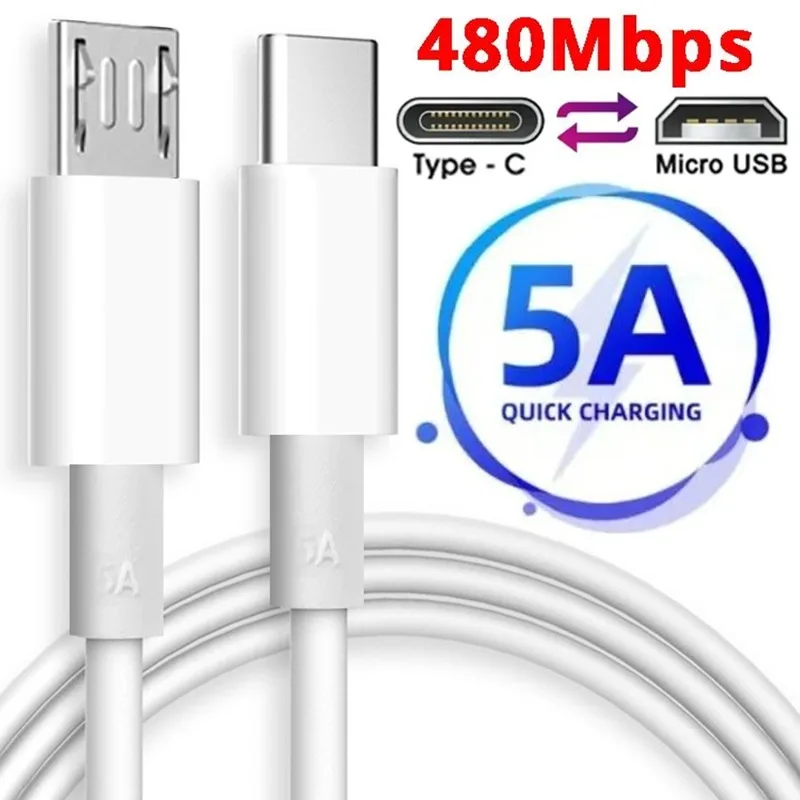
Combined cables, such as the USB Type C To Micro USB Cable, deserve special attention. This universal cable often supports not only data transfer and the OTG function but also fast charging with a power output of up to 5A. Thus, with one cable, you can charge your phone, sync data with a PC, and, by switching it to OTG mode using a special switch or adapter, connect peripherals. This is an ideal choice for users who have multiple devices with different ports.
Which Devices Can Be Connected via OTG
The possibilities of OTG are almost limitless, but everything depends on support from the Android operating system and the availability of appropriate drivers. Here is a list of the most popular devices for connection:
- Flash Drives (USB Flash Drive): the main and most common scenario. Ideal for transferring movies, photos, or backups.
- External Hard Drives (HDD/SSD): often require additional power, so they may not work with all phone models. It's better to use an active USB hub with its own power supply for them.
- Keyboard and Mouse: significantly increase productivity when working with texts or using remote desktop access to a PC.
- Gamepads: allow you to play mobile games with greater comfort.
- Digital Cameras: you can transfer photos directly to your phone for instant editing or posting on social networks.
- MIDI Keyboards and Audio Interfaces: for musicians who use their phone as a sound station.
Safe Usage Tips
Even the most expensive OTG cable can cause problems if you don't follow simple operating rules. The first thing to remember is power consumption. The phone itself powers the connected devices, which quickly drains the battery. When working with power-hungry devices (external drives), the battery can drain literally before your eyes.
Never disconnect a device without safely ejecting it.
As on a computer, before physically disconnecting a flash drive or disk, be sure to use the "Safely Remove" option in the Android settings. This prevents data loss and damage to the drive's file system. Also, avoid mechanical strain on the phone's connector. If the adapter with a flash drive is heavy, it's better to place the device on a table rather than hold it suspended.
Finally, make sure your phone actually supports OTG. This information can be found on the manufacturer's website or in the specifications on reputable tech portals. If the function is supported but the connected device is not recognized, try restarting your phone or check if the device requires separate power.

Conclusion:
An OTG cable is a small but very powerful investment in your smartphone's functionality, expanding its capabilities to the level of a compact computer. To make the right choice, focus on your device's connector type, the cable's build quality, and the specific tasks you plan to solve. Universal solutions, such as a USB Type-C to Micro-USB cable with fast charging support, will be excellent helpers for users with multiple gadgets. By following simple safety rules, you will get a stable and convenient tool for working with data and peripherals right on the go.