The modern gaming space is not just a powerful PC or console, but an entire ecosystem of devices: mice, keyboards, headphones, controllers, smartphones. Each of them requires regular recharging, which often turns into a tangle of wires on the desk and a constant search for a free USB port. Specialized charging stations for gamers exist precisely to solve these problems. They don't just organize cables; they become a centralized hub for powering and connecting all your accessories, ensuring order and uninterrupted operation during long gaming sessions.
? Also recommended
View product on AliExpress →Choosing the ideal station depends on the number of devices, the type of their connectors, charging speed, and additional features such as data transfer or connecting drives. In this article, we will look at the key selection criteria and present the top desktop charging stations, including the powerful multifunctional model EGIOZR 12-in-1, which takes the organization of the gaming space to a new level.
? Table of Contents
- Why do gamers need a specialized charger?
- Criteria for choosing a gaming charging station
- Top charging stations: from compact to all-encompassing
- Review of the EGIOZR 12-in-1 Knob Control Desktop Docking Station
- Wireless charging for gaming: convenience and nuances
- Space organization: how to integrate the station into your setup
- Conclusion:
Why do gamers need a specialized charger?
A regular USB hub or phone charger doesn't always meet a gamer's needs. Gaming peripherals often have specific current and voltage requirements for fast charging, especially wireless mice and keyboards. Additionally, during gameplay, it's important that the charging process doesn't interfere: cables shouldn't get tangled, and the device itself should sit comfortably on the station.
A specialized charger for gaming devices solves these problems by offering several connectors of different types (USB-A, USB-C, wireless pads) optimized for high power. It allows you to charge a mouse, keyboard, headphones, and controller simultaneously, freeing up standard PC ports for other needs. This is not just an accessory, but a strategic upgrade to your gaming setup that enhances comfort and efficiency.
Besides power delivery, modern gaming charging stations often integrate the functions of a docking station or USB hub. This means the ability to connect external hard drives, flash drives, monitors, or a network cable, turning them into a true command center on your desk.
Criteria for choosing a gaming charging station
Before buying a charging station, it's worth clearly defining your needs. The main selection parameters are the number and type of ports, total power, additional features, and design.
Number of ports and their variety:
Assess how many devices you typically charge simultaneously. The minimum is 2-3 ports for a mouse, keyboard, and headphones. It's better if they include both classic USB-A and modern USB-C. The presence of specialized slots or wireless pads for specific controller models (e.g., for DualSense or Xbox) is a big advantage.
The total power of the adapter and the power distribution between ports are critically important. If all ports are in use, the power must be sufficient for fast charging of each device. Look for models with smart current distribution technology (Smart IC).
Additional features include the presence of ports for data transfer (e.g., USB 3.0 for connecting an SSD), monitor output (HDMI), a linear audio output, a memory card slot, or even a built-in fan for cooling a smartphone. The design and materials (metal, plastic with anti-slip coating) should harmoniously fit into your gaming setup.
Top charging stations: from compact to all-encompassing
There are many models on the market that can be roughly divided into three categories: compact chargers for 2-3 devices, universal mid-range stations, and powerful docking stations with extended functionality.
The first category often includes stations with wireless pads and one or two USB ports. They are ideal for owners of a wireless mouse and keyboard from the same brand. The second category includes the most popular models with 4-6 different types of ports, charging indicators, and a compact body. They cover the needs of most gamers.
Powerful combos for a professional setup:
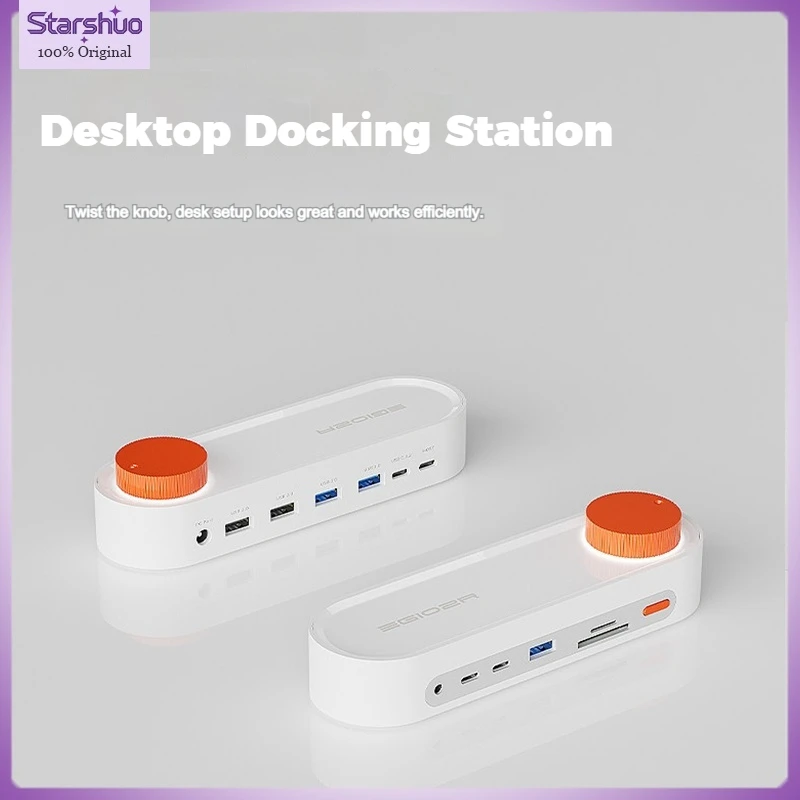
The third category is premium solutions, such as the EGIOZR 12-in-1 Knob Control Desktop Docking Station. This is no longer just a charging dock for accessories, but a full-fledged expansion hub. Such models combine dozens of ports for charging, data transfer, connecting monitors and drives, often feature convenient controls like a volume knob, and become the central element of a workstation.
Review of the EGIOZR 12-in-1 Knob Control Desktop Docking Station
This model is a prime example of the class of all-encompassing charging stations for gaming and work. Its main feature is 12 interfaces in one device, centered around a convenient mechanical knob for controlling volume or backlighting.
For charging gaming devices, it features powerful USB-A and USB-C ports with support for fast charging PD and QC. A separate USB-C port with up to 100W power can even power a laptop. You can simultaneously charge a mouse, keyboard, headphones, smartphone, and other gadgets, completely freeing up standard PC ports.
However, it is also a powerful hub: the presence of HDMI 4K ports, Gigabit Ethernet, SD/TF memory card slots, and USB 3.0 for connecting HDD/SSD makes it an ideal tool for creating a tidy and productive space. The ability to connect additional monitors or a network cable without reaching the PC case is an invaluable advantage for a gamer and streamer.
Wireless charging for gaming: convenience and nuances
Wireless charging pads built into stations offer the greatest comfort. Just place the device on a specific area, and it starts charging. This is ideal for mice and headphones that support Qi.
However, it's important to pay attention to the wireless charging power (usually 5W, 10W, or 15W) and compatibility. Not all devices support fast wireless charging. Furthermore, while gaming, a mouse on such a pad may be unusable, so it's optimal to have a separate pad specifically for the mouse or use wireless charging for devices you don't use during gameplay, such as headphones or a smartphone.
Some advanced stations offer vertical wireless pads for smartphones, allowing you to see notifications while gaming. This feature is especially useful for streamers who need to monitor multiple communication channels simultaneously.
Space organization: how to integrate the station into your setup
Even the best charger for a mouse and keyboard will be a hindrance if placed poorly. The ideal spot is within reach but not in the center of attention. Stations are often placed to the side of the monitor or underneath it on a special stand.
For models like the EGIOZR 12-in-1, which have many rear ports for stationary connections (to a monitor, network, speakers), it's important to plan cable routing. Use cable managers, ties, or desk grommets to hide the bundles going to the PC. The station itself remains visible, providing quick access to all necessary connectors.
Proper organization not only improves aesthetics but also enhances practicality. All your devices will always be charged and within reach, and the desk will be free of haphazardly thrown cables. This creates a favorable environment for concentration and victories in virtual worlds.

Conclusion:
Choosing a desktop charging station is an investment in the comfort and efficiency of your gaming experience. From compact models for a few devices to powerful combos like the EGIOZR 12-in-1, everyone can find a solution to fit their needs and budget.
Focus on the number and type of your gadgets, the required charging speed, and desired additional features such as data transfer or monitor connection. A properly chosen gaming charging station will not only rid you of "cable chaos" but will also become a reliable power and communication center for your entire digital army.